Blog, news and articles
About FileMaker, AI och Business development


About FileMaker, AI och Business development
I see opportunities where others see drawbacks. That is the shortest summary I can give of thirty-seven years as a consultant, and it explains why my clients call me even when the question is not really about a computer system.
In the early 1980s I hung out in the computer lab at Dragonskolan in Umeå. It had Norsk Data ND-100 terminals connected to a minicomputer. In the evenings I taught myself to program in Basic.
My dyslexia made it a real challenge. A single spelling mistake and the whole line was wrong, so I had to type it again from the beginning. Still, I sat there evening after evening, fascinated by what you could actually get a computer to do.
One day there was a computer exhibition in “Smörasken”, the yellow building in the middle of central Umeå. That is where I saw an Apple Macintosh for the first time. A computer with a graphical interface that you controlled with a mouse instead of typing commands. For someone who struggled with every command, it was a liberation. An aha moment.
By the late 1980s I had moved to Stockholm and was working at MicroPlus on Malmskillnadsgatan, a shop selling software by mail order.
A customer came in with a problem in his customer register. He had built it on his Macintosh in MS-File. I spent several hours trying to help him before I finally gave up.
A few weeks later I was invited to Studentlitteratur’s demonstration of Claris FileMaker II at the Sheraton hotel in Stockholm. What the customer had struggled with, I could solve in five minutes in FileMaker. I was one of five people who received the very first disk, together with a manual copied on an ordinary photocopier because the packaging had not yet arrived from the printer.
The simplicity was fantastic. Just as with the Macintosh, I did not have to type commands. I fell in love on the spot; you could call it an aha moment. I had no idea, of course, that this day would decide the rest of my working life.

After a couple of months I was asked whether I would help demonstrate FileMaker II at Sweden’s first Apple trade fair, Apple Business Forum in Sollentuna. I said yes.
There I met Börslistans Informationstjänst, BIT. They had trouble handling the reply coupons for their annual report service: thousands of recipients, different requesters and combined mailings that were unreasonable to manage by hand. I built a solution in FileMaker II and they were pleased.
That was my first FileMaker project, in 1989.
In the autumn of 1989 I started in telephone sales at BIT’s sister company Branschförlaget, which sold advertising in industry directories such as Vem är Vem i svensk finansvärld (Who’s Who in Swedish Finance).
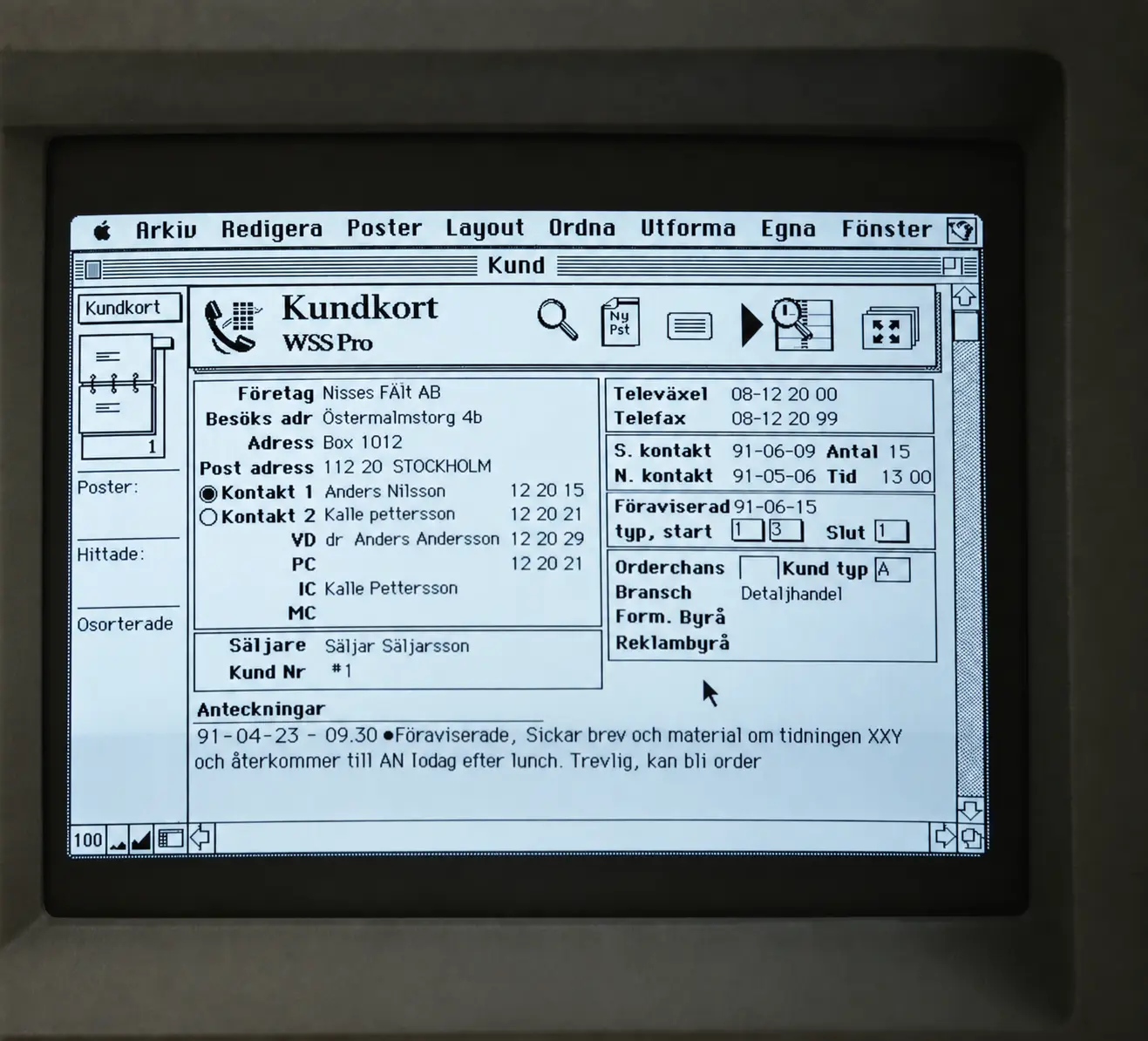
I left my phone number with the people I could not reach. When they called back, I had no idea who they were or where in the sales process we were. Binders and phone lists were simply not enough. So I built a sales support and advertising order system in FileMaker II, one of the very first for Macintosh.
Suddenly I had full control of every customer, every conversation and every next step. I outsold colleagues with many more years in the profession, which they were less than thrilled about. When all the salespeople were given access to the system, the mood turned. My manager named the system WSS Pro – Watz Sales System Pro, where Pro stood for FileMaker Pro 1.0.
CRM (Customer Relationship Management) did not yet exist as a concept. It appeared ten years later. Today my system is called Kundvårdsprogrammet, and it still forms the core of several of my clients’ solutions.
In a few years I went from being unable to spell a command correctly to having the whole company working in my system.
I left Branschförlaget and went into business for myself. At 18 I founded the consultancy Watz & Co. The first clients were media companies that wanted the advertising order system I had built.
From 1990 onwards I worked with companies on two fronts at once: their processes and routines, and the technology in FileMaker. It is a combination I have held on to ever since.
The business continued as P. Watz & Co AB, which was renamed Watzit AB in 1996. At our peak in the late 1990s we had ten employees and six subcontractors. I was managing director until 2000, when my mentor Olle Åström took over the operational role.
The IT and telecom crash, together with 11 September 2001, led to a restructuring through bankruptcy in 2003 and a fresh start as Watzit 2.0 AB, the same company that today is called Peter Watz AB.
A heavily slimmed-down organisation with no costly premises.
Development and support for Poolia continued without interruption. No clients were caught in the middle because of the restructuring.
Some projects required me to hire external consultants. A couple of projects ended up more than ten times as expensive as estimated because of internal problems at my partners. A couple of my clients were not satisfied. I was not satisfied with the situation either. For several years this affected how I could help my clients.
In January 2023 I started using ChatGPT. It was the same feeling as at the Sheraton in 1989 and at Smörasken a few years earlier. A real aha moment, again.
Development had been moving fairly fast before that. FileMaker had started releasing updates every year instead of every 18 months. Even so, with new AI models arriving every three to six weeks and new services every day, FileMaker was still behind.
Thanks to AI, I needed to bring in external FileMaker specialists less often, because I could now build even the complex parts in FileMaker myself. AI also helps me maintain solutions I developed long ago. It has made me faster, more confident in my deliveries and independent of whether someone else has the time.
For some time now it has also been possible to develop in FileMaker with AI alongside (vibe coding). Beyond help with scripts and calculations, I have gained a sounding board that helps me plan and build, and a quality reviewer that checks that everything turned out right. The AI services can write code, but a large part of my job is understanding the client’s business and the owner’s or managing director’s goals, and sensing what the real problem is. The AI services are not there yet.
The fact that something can be built technically does not mean it is right for the business. That is where my real value lies.
I know:
The combination is fairly unique. You usually get either a programmer or a business developer, and having all these skills in one person makes things enormously easier.
With you as managing director I talk finances, business model, margins and risk. With your suppliers, your IT department or other developers I talk data models, integrations and access privileges. No interpreter is needed in between. Misunderstandings are kept to a minimum, and misunderstandings are where most IT projects go off the rails.

The logo symbolises my two different roles.
The Swedish National Audit Bureau (Riksrevisionsverket, RRV) was auditing the reports of my client, the government agency KRUS. The verdict was that the report from my system was calculating incorrectly.
We started troubleshooting. After 20–25 hours we had still not found any error in FileMaker. Nothing matched the remark from RRV.
So I asked for a meeting with the auditor and the client. After coffee and pleasantries I asked him to show me on the report where the error was, since I simply could not find it. He ran his finger from left to right across the page.
That was when the penny dropped. The report was meant to be read from top to bottom. I pointed, he looked for thirty seconds and said: “OK, but then it adds up.” Then the meeting was over.
The system had calculated correctly all along. The report was still wrong, because it could be read in two ways. It cost 20–25 hours of troubleshooting for a layout I had designed that could be misread. Since then I design reports based on how the recipient will read them.
I have sat with sales lists in binders, I have sold over the phone, I have had employees and I have run companies through two crises. When I map out a database structure, I think further ahead. The structures I have designed myself have lasted more than 25 years. Three of them are still used daily by the same clients.
“I start with the business instead of the database” – Peter Watz
My name is Peter Watz and I have worked with FileMaker since 1989. It started at Branschförlaget, where I worked in telephone sales with no system support and built my own sales support system, WSS – Watz Sales System, in FileMaker II. That was roughly ten years before the term CRM reached Sweden. Since then I have delivered more than 200 systems, three of which are still in production after more than 26 years.
I run FileMakerKonsulterna as part of Peter Watz AB (company reg. no. 556769-9649). Over the years I have also run Watz & Co, Watzit AB and my own FileMaker hosting service.
My background is unusual among consultants. I am a developer with a foundation in business administration, sales and business communication. That means I start with the business instead of the database. When I sit down with a client, the first hours are about how the work is actually done, where the time goes and what happens when someone makes a mistake. Only then do I start designing.
My technical skills have been built in live client projects since 1989, supplemented by continuous training through Claris conferences, developer networks and the platform’s own channels. I work closely with Claris and am continuously involved with upcoming versions of the platform.
I build systems that are meant to last ten to twenty years. That places demands on the architecture from day one, much like constructing a high-rise: the blueprint determines how high you can build later.
I work in the latest version of FileMaker, currently version 26. At present I spend a significant amount of time on the platform’s AI features: field annotations for AI, semantic search and how language models can be used with business data in a controlled way.
A system is right when it saves time. If it is the wrong solution, it shows in the calendar straight away. That is why I measure my projects in hours, error rates and lead times.
Concrete results from my assignments: Poolia grew from 200 to 4,600 employees and from 3 to 36 locations in four countries on the same core architecture in the PASS system. Peter Sotare/SoVent Group saved more than 10,000 hours. Bonnier Företags Information / ISO-Guiden cut its catalogue production time by 80%
I have been speaking and teaching for more than twenty years, alongside my development work. It shows in the projects: I write documentation people can actually use, run training that sticks and can explain technology to a board without anyone having to pretend they understand.
Staffing and recruitment, chimney sweeping and ventilation, recycling and environmental services, central government, publishing and media, transport and logistics, finance and law, IT and web agencies, conferences and events, property, health, food.
Named references: Poolia, Peter Sotare AB / SoVent Group, Bonnier Företags Information / ISO-Guiden, Returab, KRUS / VERVA, Börslistans Informationstjänst, Kompetensgruppen.
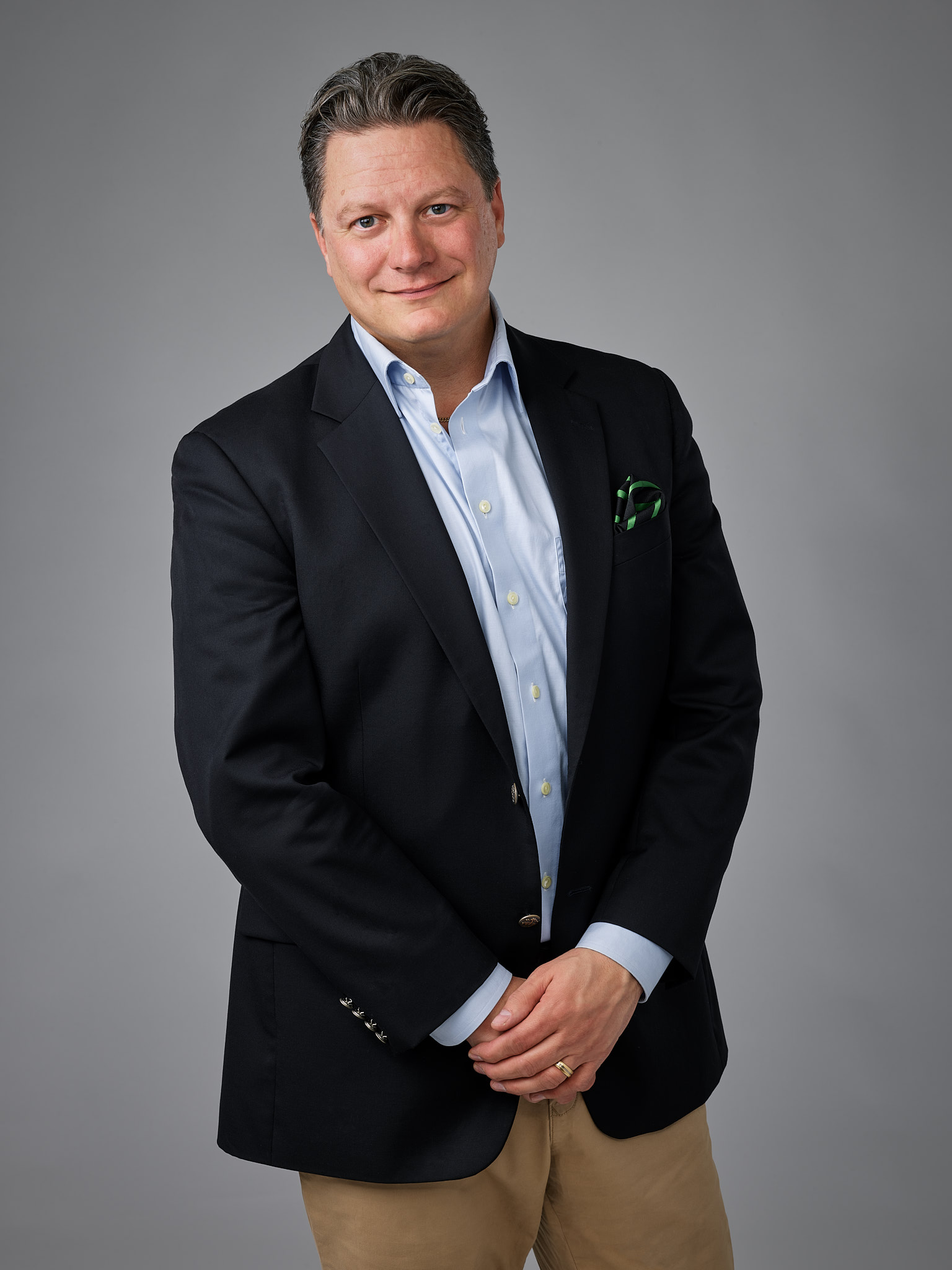
Peter Watz
Developer guidelines and naming conventions — draft
This document describes how KVP 26 is built, and the rules a developer follows when changing it. Names in the solution are in Swedish and are quoted exactly as they appear in FileMaker. The User documentation has a glossary of the Swedish terms.
KVP 26 uses the separation model with three files, all hosted on FileMaker Server:
| File | Role | Contents |
|---|---|---|
| KVP 26 ED | Front end | Layouts, scripts, value lists and navigation. Its only tables are Globaler (global fields) and the two tables of the calendar add-on. |
| KVP 26 ED Database | Data | All business data in 39 tables, for example Företag, Person, Händelser, Dokument, Order, Orderrader, Faktura, Fakturarader, Projekt, Artikel, Märke, Märkning, Nav and KVP (settings). |
| KVP 26 ED Documents | Documents | Stored files (Files) and icons (Icon). |
External data sources:
KVP 26 databases and the documents through KVP26_Dokument. Both use relative file: paths, so the solution works wherever the three files are hosted together.KVP 26 and KVP 26 ED), so that a user who opens one of them directly is sent to the front end.Start-up:
1.2 Vid Start. It checks the account (Konto – efter inloggning [Sub]), sets the global filters and dates, registers the MBS plug-in (1.8 Kontrollera och registrera pluggar) and opens the start menu.Start, which hands over to the front end.Security is described for users in the user documentation, under Users and privileges. The technical points:
Kundutvecklare, Superuser, Användare or Titta. The owner's Admin account has [Full Access].Konto – alla filer [Sub] runs Konto – utför [Sub] in the data file, the documents file and the front end, in that order, and rolls back if a step fails.Get ( AccountPrivilegeSetName ) and Get ( AccountExtendedPrivileges ), which return the real account even inside a full-access script.Every field name carries a prefix that tells the field's storage and data type. The data type decides the prefix, never an older name.
| Data type | Ordinary | Global | Calculation | Global calculation |
|---|---|---|---|---|
| Text | tx |
gtx |
ctx |
gctx |
| Number | n |
gn |
cn |
gcn |
| Date | d |
gd |
cd |
gcd |
| Timestamp | ts |
gts |
cts |
gcts |
| Time | ti |
gt |
cti |
gcti |
| Container | c |
gb |
cc |
gcc |
Time and container are deliberately different from the other rows: a global time field is gt, but a calculated one is cti; a global container is gb, but an ordinary one is c.
Summary fields start with stat followed by a capital letter, for example statSummaInbetalt.
An ordinary field with an auto-enter lookup or calculation says so right after the type prefix: al for a lookup and ac for a calculation. Examples: txalBenämning and txacInnehåll. Serial numbers, variables and constants get no marker.
IDP_<own table>, a number with an auto-enter serial number. Example: IDP_Företag.IDF_<target table>. Example: IDF_Projekt.IDF_Person.Best and IDF_Person.Lev. Pairs are kept symmetrical.Artikel::txArtikelnummer, for example, is a natural key.ID, ID1 … ID5 are constant fields for relationships and are left as they are.A functional group prefix is kept after the type prefix and marker, without its underscore: txalBest_Adress. Global fields have no underscores. Square brackets are written as a dot, so that the name can be used without quotes in a calculation: cnStatSum obet.portal1.
Every prefixed field has a FileMaker 26 display name equal to its name without the prefix. Users see Bankgiro where the schema says gtxBankgiro. Keys keep their full name as the display name.
A name ending in ## is the developer's own marker for something to come back to. It is never removed during a rename or a clean-up.
Scripts are numbered group.subgroup.script, and each group starts with a heading script. The main groups are:
| Group | Heading | Contents |
|---|---|---|
| 1 | Internt (Internal) | Start-up, closing, window handling, plug-in registration. |
| 2 | Förflyttning (Navigation) | 2.1 Navigering and its sub-scripts, the history (back and forward). |
| 3 | Gå till rel (Go to related) | Moving between related records, for example from a portal row to the record. |
| 4 | Poster (Records) | Creating, deleting and copying records; guides that create records. |
| 5 | Fält & Beräkningar (Fields and calculations) | Setting and inserting values, merge fields, notes, mass tagging. |
| 6 | Sök (Find) | Find scripts for each module. |
| 7 | Sortera (Sort) | Sort scripts for each module. |
| 8 | Utskrifter (Printing) | Printing and sending, with shared helper scripts in 8.0. |
| 9 | Imp & Exp (Import and export) | Export of addresses, the import guide, sending by email. |
| 10 | Övrigt (Other) | Opening URLs, attachments to letter templates, and the collected functions below. |
Group 10 also holds functions that are kept together, with their original numbers, under their own sub-headings:
Three groups are not numbered on purpose:
Konto – byt eget lösenord [Start].Avsluta (Quit) is shown in the Scripts menu.| Suffix | Meaning |
|---|---|
[Start] |
Entry point, started by the user. |
[Sub] |
Sub-script, only called by other scripts. |
[Knapp] / [Button] |
Run from a button. |
[MP] |
Takes a script parameter (manusparameter). |
[Remote] |
Called from another file. |
Scripts pass several values in one parameter as name–value pairs, built and read with the custom functions SparaData ( name ; value ) and HämtaData ( parameter ; name ). BytData replaces a value in such a list. Example:
SparaData ( "PeID" ; Person::IDP_Person ) & SparaData ( "Ursprung" ; "Person" )All moves between modules go through 2.1 Navigering with a navigation code as parameter, for example "2:2". The codes are kept as records in the table Nav:
txNavCode: the code;txNavLayout: the layout to go to;txNavScript: a sub-script to run after the move;txNavReturn: whether to return to the original layout.2.1.2 _record_NavHistory records each move, so that the yellow back and forward buttons work.
Important: layout names are stored as data in Nav::txNavLayout. Renaming a layout breaks navigation until the name in Nav is changed as well.
Table occurrences in the front end are named anchor_target_purpose:
Företag.Händelser.Företag_Händelser_FöID and Projekt_Händelser_filter.A dot qualifies the relationship further, often by the field it matches on: Import_Foretag.ctxForetag.
Short forms are used in long chains: Dok_ (Dokument), Imp_ (Import), Pers_ (Person), Före_ (Företag).
Two families are generated by pattern and belong together:
Agenda_Händelser_DagN_HH_HH: one occurrence per day and hour in the week view of the agenda, anchored at Agenda_Vecka.Översiktpersons_Händelser_HH_HH: one occurrence per hour in the staff overview.Occurrences used only to create records through a relationship end in _skapa or _Skapa, for example Person_Märke_Skapa.
Layouts are grouped in folders by module: Meny, Koncern, Företag, Person, Händelser, Projekt, Kalender, Order, Dokument, Faktura and Artikel. In addition:
Layout names are built as module_view:
| Suffix | View |
|---|---|
_Inmatning |
Entry view (form) for one record. |
_Lista |
List view. |
_Rapporter |
Printing and reports for the module. |
Kort |
Card window, for example Händelser Kort. |
_Utskrift |
Print layout. |
Print and report layouts are named after what they print, for example Faktura Bokf underlag Fakturor. Only end-user layouts are shown in the Layouts menu. All layouts in the front end use the KVP26 theme.
1.8 Kontrollera och registrera pluggar checks at start-up that the plug-in is installed and registered. If it is missing, the script installs it from a container field in the settings (KVP::cMBS_Mac and KVP::cMBS_Win).FCCalendarAddon::ConfigStore and name the fields of Händelser and the event card Kalender_Händelser Kort. The add-on fetches events with Execute FileMaker Data API on that card, and the Data API returns only fields that are on the layout. Every field the configuration names must therefore stay on Kalender_Händelser Kort, including the primary key Händelser::IDP_Händelser. The key is placed outside the visible area and hidden with "Hide when: 1".| Function | File | Purpose |
|---|---|---|
SparaData, HämtaData, BytData |
Front end, data | Name–value pairs in script parameters. |
ChangeFilenamne.FMP.to.OS |
Front end | Converts a FileMaker path to the operating system's format. |
_BehörighetsnivåTillUppsättning |
Front end | Maps a KVP privilege level to a privilege set. |
_KontoFelmeddelande |
Front end | Turns an account error code into a message. |
FCCalendarConfig, FCCalendarDataURL |
Front end | Calendar add-on. |
TagbortFormat |
Data | Removes text formatting (styles, fonts and colours), for example from pasted text. |

Many companies adapt their processes to fit a standard system. With FileMaker, the system is shaped around how you work, today and five years from now.
I have been building custom business systems on the FileMaker development platform since 1989. The combination of business development and a flexible platform gives the systems an unusually long life. Three of my solutions have been in daily operation for 26 years.
© Peter Watz AB 2026


